SUPPORT PRINTYTRON
New Model
REV 40 · 28 SEPTEMBER – 4 OCTOBER

2 DETAILS · 6 CHANGES
Detail40-AImproved

Builds keep going when you step away

Start a build, then lock your phone, switch apps, minimise the window or close the tab. The build carries on, and the model is waiting when you come back. Before this week, almost 1 reply in 10 never finished on phones. About 1 turn in 36 sat waiting on a build that never came back, until a 30-minute limit ended it.
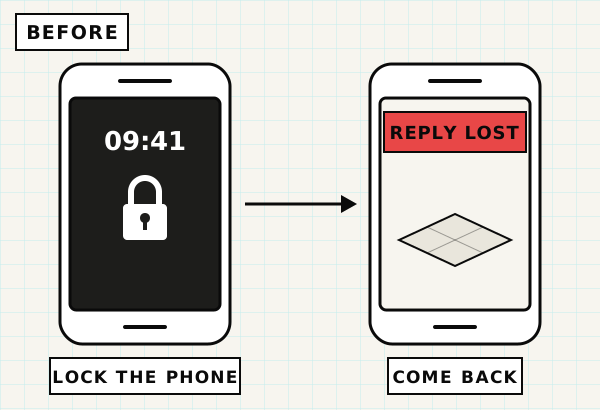
Before: a phone locked mid-build, then the same phone later showing REPLY LOST over an empty build plate.FIG. 40-A.1
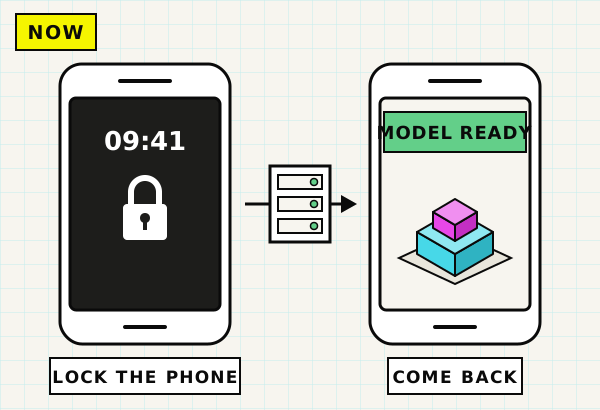
Now: the phone locked mid-build while Printytron's servers keep building, then the same phone later showing MODEL READY with the finished model.FIG. 40-A.2
FIG. 40-A.1 + A.2 — Lock your phone mid-build. Before, the reply could be lost. Now the model is waiting when you come back.

A dropped connection no longer ends Printy's reply. Printytron's servers also build every model, and the build no longer depends on your tab staying open. Close the tab, and the finished model waits in My Models as a draft.


Detail40-BImproved

Your model is on screen sooner

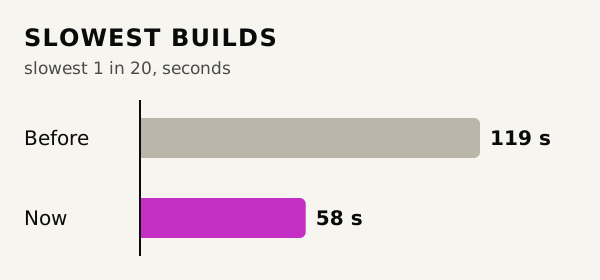
A typical build takes 2.9 seconds, down from 4.8. The engine runs once per build instead of twice. Its slowest builds take about half as long: 58 seconds against 119.
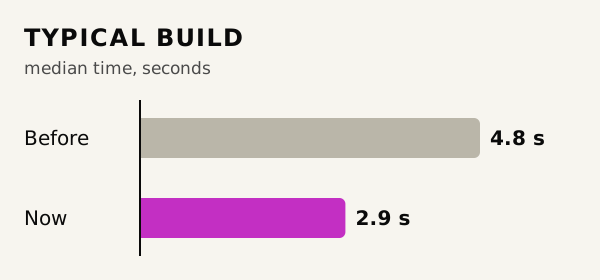
Bar chart of the typical build: 4.8 seconds before, 2.9 seconds now.FIG. 40-B.1
Bar chart of the slowest 1 in 20 builds: 119 seconds before, 58 seconds now.FIG. 40-B.2
FIG. 40-B.1 + B.2 — The typical build with one engine run against two, and the slowest 1 in 20 builds on the new engine against the old.

Models come out whole as well. The old engine had a bug that silently dropped parts of a model. It hit 67 builds in 23 days. Everyone is on the new engine, up from about half last month, and the build page downloads one engine instead of two, 13.8 MB less.

Smaller changes and fixes

  1. 40.01Improved

    Your models reopen in a second and a half.

    Models you build from this week on reopen from a stored copy, in about 1.6 seconds typically and within 3 seconds 9 times in 10. Before, every reopen rebuilt the model and took 5–30 seconds.

  2. Rate Printy's models.

    Every rating helps us make Printy better, and we read them all. Thumbs up and down sit under every reply that made a model, on phones and desktop.

  3. A heads-up before every update.

    We're taking more care with releases. Every update starts with a notice on the build page a few minutes before it lands, and you can join the Discord to follow along.

  4. 40.04Fixed

    Build with the page in your own language.

    You can build with Chrome translating Printytron into your language, and the translation stays on. Before the fix, a translated page could crash mid-build and lose the reply, 139 times for 48 people in a month.

  5. 40.05Fixed

    Remix from the real thing.

    A remix of a coloured model arrives with the original's colours and part names, so you can ask for a change to a part by name straight away. Before, a remix came out gray with no part names until its next build.

  6. Follow these updates by RSS.

    This page is new, with every week's changes since September, and it has an RSS feed.
REV 39 · 21–27 SEPTEMBER

1 DETAIL · 5 CHANGES
Detail39-AImproved

Multi-part downloads arrive as separate objects

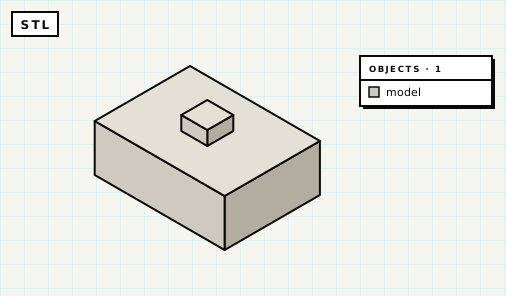
An STL of a three-part box: the base, lid and knob are one grey object, and the slicer's object list shows a single model.FIG. 39-A.1
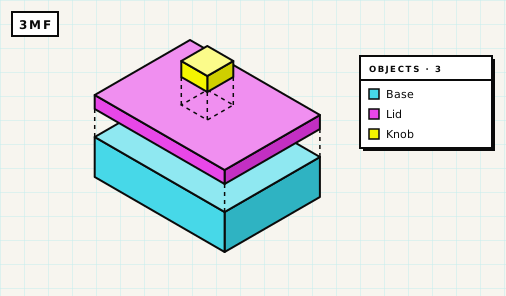
A 3MF of the same box, pulled apart: the base, lid and knob are three separate coloured objects, listed as Base, Lid and Knob.FIG. 39-A.2
FIG. 39-A.1 + A.2 — The same three-part model as an STL (one welded mesh) and as a 3MF (one object per part).

A multi-part model reaches your slicer as separate objects, one per part, when you use the 3MF or OBJ downloads. An STL is one welded mesh.

Parts that touched each other used to be exported as open shells, and slicers dropped layers from them. That hit 32 of the 60 newest multi-part models. Every object in the file is closed and printable now. Separate parts come through as their own objects, parts that touch come through as one object per connected piece, and part colours still come through, with Bambu Studio keeping them.

Smaller changes and fixes

  1. 39.01Fixed

    Builds finish in a background tab.

    Switching to another tab mid-build used to stall about 1 build in 25 (4.2%) for two minutes or more. The build now finishes while you're away, and the preview picture is taken when you come back.

  2. 39.02Fixed

    You stay signed in.

    A login lasts 30 days from your last visit, where it used to end 7 days after you signed in. If it does expire, the build page offers to sign you back in.

  3. 39.03Fixed

    Builds work on Safari 27.

    Most builds on Safari 27 were failing. A failed build now retries in a way that works there, and the page may pause for a moment while it does.

  4. 39.04Improved

    Home page rewritten and Info menu added.

    The home page is rewritten, and the header has an Info menu holding the Guide, the Blog and About.

  5. Fortnightly email about your published models.

    If people downloaded or remixed models you've published, a "Your models are loved!" email tells you which ones and how many, once a fortnight. You can switch it off in the email preferences on your account page.

REV 38 · 14–20 SEPTEMBER

4 CHANGES

Changes and fixes

  1. 38.01Changed

    A monthly prompt limit.

    There's now a monthly cap on prompts, counted across all your models and on top of the per-model limit, to keep running costs under control because every build runs on real compute. If you're signed in you'll get a heads-up at about three-quarters of the month's prompts, reaching the limit loses nothing, and if you need more you can email support@printytron.com with a bit about what you're making.

  2. Support Printytron.

    If you'd like to help with those costs, every tip in the Tip Jar earns the Supporter badge on your account. Or order filament through our eSun partner link. Your price stays the same, but Printytron gets a small commission to go towards our costs.

  3. Printy speaks German.

    Describe your part in German and Printy builds it. There's a German facts page with an English/German switch, plus a blog post, "Ich spreche Deutsch.".

  4. 38.04Fixed

    Shared model links show their picture.

    Links to Printytron models shared on X now show the model's picture, and Google Images can find gallery models. Shared links had shown no picture since May.

REV 37 · 7–13 SEPTEMBER

1 DETAIL · 5 CHANGES
Detail37-ANew

Measuring tools in the viewer

The build plate carries X, Y and Z axis letters, and a FRONT label marks the front edge. Press the ruler button and the viewer draws dimension lines on the model like a technical drawing, or on a single part when you select it. A size chip in the bottom-left corner shows the size of the model or of the selected part, and switches between millimetres and inches.

CLIP 37-A.1
CLIP 37-A.1 — Rulers off and on, the hooks selected on their own, then millimetres to inches.

If you're signed in, your unit choice (inches or millimeters) is saved and follows you to your other devices. A DIMENSIONS list dropdown summarizes the model's key measurements, each with a short description. Printy sees the measured size of the model and of each part after every build, including whether an edit changed any of them, and she knows which side of the model you're looking at.

Smaller changes and fixes

  1. 37.01Fixed

    Printy always says what she built.

    About 13% of builds used to end without a reply. That gap is closed.

  2. 37.02Improved

    Enter on phones and tablets.

    On a touch screen, Enter starts a new line and the Send button sends, while Ctrl+Enter or Cmd+Enter does the job on a hardware keyboard.

  3. 37.03Improved

    Browsers that can't build.

    If your browser can't run the builder (iPhone Lockdown Mode is one example), you're told as soon as the page loads, before you use a prompt.

  4. 37.04Fixed

    Reopening a saved model.

    The viewer shows "Rebuilding model…" while the model rebuilds, which takes 5–30 seconds. It used to show an empty plate.

  5. 37.05Beta

    Beta: Printy Brain Candidate is opt-in.

    It's off by default for beta members, who can switch it on in BETA OPTIONS.