SUPPORT PRINTYTRON
New Model
DWG. NO. PRT-2026-013 — UPDATES AND RELEASE NOTES04 WEEKS ON FILE
SHEET 02.4Info

Updates and release notes.

Every change you'd notice. New things, fixed things, and anything that works differently now.

// We express love through making things. <3

REV 39 · 21–27 SEPTEMBER

1 DETAIL · 5 CHANGES
Detail39-AImproved

Multi-part downloads arrive as separate objects
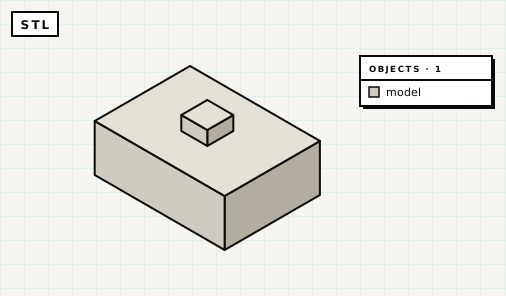
An STL of a three-part box: the base, lid and knob are one grey object, and the slicer's object list shows a single model.FIG. 39-A.1
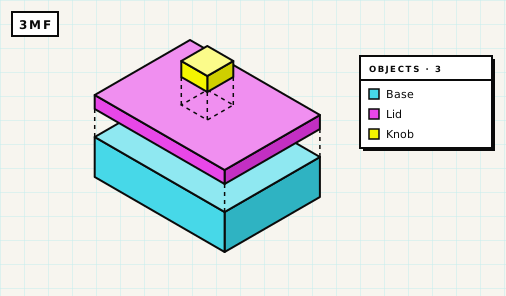
A 3MF of the same box, pulled apart: the base, lid and knob are three separate coloured objects, listed as Base, Lid and Knob.FIG. 39-A.2
FIG. 39-A.1 + A.2 — The same three-part model as an STL (one welded mesh) and as a 3MF (one object per part).

A multi-part model reaches your slicer as separate objects, one per part, when you use the 3MF or OBJ downloads. An STL is one welded mesh.

Parts that touched each other used to be exported as open shells, and slicers dropped layers from them. That hit 32 of the 60 newest multi-part models. Every object in the file is closed and printable now. Separate parts come through as their own objects, parts that touch come through as one object per connected piece, and part colours still come through, with Bambu Studio keeping them.

Smaller changes and fixes

  1. 39.01Fixed

    Builds finish in a background tab.

    Switching to another tab mid-build used to stall about 1 build in 25 (4.2%) for two minutes or more. The build now finishes while you're away, and the preview picture is taken when you come back.

  2. 39.02Fixed

    You stay signed in.

    A login lasts 30 days from your last visit, where it used to end 7 days after you signed in. If it does expire, the build page offers to sign you back in.

  3. 39.03Fixed

    Builds work on Safari 27.

    Most builds on Safari 27 were failing. A failed build now retries in a way that works there, and the page may pause for a moment while it does.

  4. 39.04Improved

    Home page rewritten and Info menu added.

    The home page is rewritten, and the header has an Info menu holding the Guide, the Blog and About.

  5. Fortnightly email about your published models.

    If people downloaded or remixed models you've published, a "Your models are loved!" email tells you which ones and how many, once a fortnight. You can switch it off in the email preferences on your account page.

REV 38 · 14–20 SEPTEMBER

4 CHANGES

Changes and fixes

  1. 38.01Changed

    A monthly prompt limit.

    There's now a monthly cap on prompts, counted across all your models and on top of the per-model limit, to keep running costs under control because every build runs on real compute. If you're signed in you'll get a heads-up at about three-quarters of the month's prompts, reaching the limit loses nothing, and if you need more you can email support@printytron.com with a bit about what you're making.

  2. Support Printytron.

    If you'd like to help with those costs, every tip in the Tip Jar earns the Supporter badge on your account. Or order filament through our eSun partner link. Your price stays the same, but Printytron gets a small commission to go towards our costs.

  3. Printy speaks German.

    Describe your part in German and Printy builds it. There's a German facts page with an English/German switch, plus a blog post, "Ich spreche Deutsch.".

  4. 38.04Fixed

    Shared model links show their picture.

    Links to Printytron models shared on X now show the model's picture, and Google Images can find gallery models. Shared links had shown no picture since May.

REV 37 · 7–13 SEPTEMBER

1 DETAIL · 5 CHANGES
Detail37-ANew

Measuring tools in the viewer

The build plate carries X, Y and Z axis letters, and a FRONT label marks the front edge. Press the ruler button and the viewer draws dimension lines on the model like a technical drawing, or on a single part when you select it. A size chip in the bottom-left corner shows the size of the model or of the selected part, and switches between millimetres and inches.

CLIP 37-A.1
CLIP 37-A.1 — Rulers off and on, the hooks selected on their own, then millimetres to inches.

If you're signed in, your unit choice (inches or millimeters) is saved and follows you to your other devices. A DIMENSIONS list dropdown summarizes the model's key measurements, each with a short description. Printy sees the measured size of the model and of each part after every build, including whether an edit changed any of them, and she knows which side of the model you're looking at.

Smaller changes and fixes

  1. 37.01Fixed

    Printy always says what she built.

    About 13% of builds used to end without a reply. That gap is closed.

  2. 37.02Improved

    Enter on phones and tablets.

    On a touch screen, Enter starts a new line and the Send button sends, while Ctrl+Enter or Cmd+Enter does the job on a hardware keyboard.

  3. 37.03Improved

    Browsers that can't build.

    If your browser can't run the builder (iPhone Lockdown Mode is one example), you're told as soon as the page loads, before you use a prompt.

  4. 37.04Fixed

    Reopening a saved model.

    The viewer shows "Rebuilding model…" while the model rebuilds, which takes 5–30 seconds. It used to show an empty plate.

  5. 37.05Beta

    Beta: Printy Brain Candidate is opt-in.

    It's off by default for beta members, who can switch it on in BETA OPTIONS.

REV 36 · 31 AUGUST – 6 SEPTEMBER

5 DETAILS · 8 CHANGES
Detail36-ANew

A new engine for builds

Printy builds your model with a new engine, and the difference shows in the numbers: builds are faster and model files come out 4.5–6.4× smaller, so downloads and previews load quicker. Publishing a large model from a phone used to fail; it holds up now.

About half of all builds already run on the new engine. It runs alongside the old one for testing before everyone moves across, and it makes room for things Printy couldn't do before.


Detail36-BImproved

Save as a new copy brings the whole build

Save as a new copy takes the model, the conversation and the build history along with it. Because she has the whole history, Printy's next edit on the copy lands where you meant it.

That makes it the way to branch an idea without risking the original, or to try variants safely.


Detail36-CNew

Name the part you want changed

Models come back split into named regions, each shown in its own colour in the viewer, so you can point at the piece you want changed. Ask for things like "Make the handle thicker." "Round off the base." "Move the mount 10mm left."

If she hasn't labelled the bit you're after, ask her for more parts. The feature has an off switch as well: More Parts Mode, in the gear menu above the message box.


Detail36-DBeta

The beta program is open

New features reach beta members first, weeks before everyone else, and members get to influence them while they're still soft enough to change. Each beta feature has its own switch in the BETA OPTIONS menu at the top left of the preview, and members get a Beta Tester badge on their account. Places go to the people most invested in Printy: those building things, sending feedback and engaging with the team.

Two features are in the program to start. Attach an image lets you give her a photo, a sketch on the back of an envelope or a dimensioned drawing, and she works from the picture as well as your words. Printy Brain Candidate is a new brain for her, faster and often better on the first try, and still being tuned, which is why beta members get it early.


Detail36-ENew

Printytron has a Discord

A place to see what everyone else is making, ask how someone got a tolerance right, and tell us what Printy should do next. Changes get announced there first, and the beta group hangs out there. It's small right now, which is when turning up counts.

Smaller changes and fixes

  1. 36.01Fixed

    Front and back are the right way round.

    Printy used to have them swapped, so "tilt it forward" went the wrong way and text came out mirrored.

  2. Password reset from the sign-in box.

    If you forget your password, a reset link is waiting there.

  3. 36.03Fixed

    OBJ and 3MF downloads save reliably.

    Some quietly never saved before; the file is now built while you fill in the form and saves the moment you click.

  4. 36.04Improved

    Curve detail scales with size.

    Small round features such as holes and pins stop wasting triangles on detail nobody can see.

  5. 36.05Fixed

    Missing pieces caught before building.

    A build used to report success with a piece quietly missing; she checks for it before the build runs.

  6. 36.06Fixed

    iPhone page zoom and Tools menu fixed.

    Tapping the message box no longer zooms the page, and the Tools menu no longer hides behind the placeholder text.

  7. Email preferences on your account page.

    Each list comes with one-click unsubscribe.

  8. New blog post, "The week you showed up".

    It covers the Hacker News weekend, with the actual numbers.